
Monitor Light Bar Eye-Care
4.2Editor score
Ultrawide coverage design
Stepless dimming control
USB power source
Finding the right light behind monitor for eye care is essential for anyone spending long hours at a desk. These specialized lamps reduce screen glare and provide balanced illumination to protect your vision during extended use.
We evaluated ten leading models based on optical design, eye care features, and ease of use. Our analysis focuses on how each product minimizes strain while enhancing your workspace comfort and productivity levels significantly.
Each pick highlights specific strengths and ideal use cases for different users. Please note that availability and pricing may change over time so check current listings before making your final purchase decision today.
4.2Editor score

4.7Editor score

4.6Editor score
As an Amazon Associate we earn from qualifying purchases.
The following table provides a side-by-side comparison of all ten products to help you quickly identify key specifications and features that matter most for your specific workspace needs.


The BenQ ScreenBar Halo 2 stands out as the top choice for users seeking premium eye care lighting. With a rating of 4.7 stars it delivers exceptional performance and advanced features designed to enhance visual comfort.
We may earn a commission when you buy through this link, at no additional cost to you.
Its wireless controller offers precise adjustments for brightness and color temperature while the built-in motion sensor automates power usage. The asymmetrical optical design ensures light falls only on your desk never reflecting on the screen.
While the price is higher than many alternatives the build quality and advanced features justify the investment for professionals. The backlight feature reduces contrast strain which is a unique benefit in this category.
This model is ideal for designers and office workers who prioritize eye comfort and convenience. If you seek the best overall experience with minimal setup hassle this light bar is the recommended choice.
The included wireless dial allows quick adjustments without reaching for the monitor or keyboard controls making workflow interruption minimal during tasks.
The ambient backlight softens the contrast between bright screens and dark rooms which helps your eyes relax during long sessions.
We may earn a commission when you buy through this link, at no additional cost to you.
This Monitor Light Bar offers exceptional value for those seeking effective eye care without a high cost. It provides wide coverage for ultrawide setups and features stepless dimming for precise control.
We may earn a commission when you buy through this link, at no additional cost to you.
The asymmetric design ensures light targets your desk without glare while the memory function remembers your last settings. Installation is quick with the counterweight clip fitting most monitor types.
Although it lacks advanced wireless controls the core lighting performance is strong for the price. It serves well for students and home office users needing reliable desk illumination.
Choose this model if you want a budget friendly option that still delivers on eye comfort and coverage. It is a solid entry point into monitor lighting systems.
The 15.7 inch length ensures even illumination across larger desks and monitors eliminating dark spots that can cause eye fatigue.
Simple buttons on the side allow quick toggles of color and brightness making it accessible for all users without complexity.
We may earn a commission when you buy through this link, at no additional cost to you.
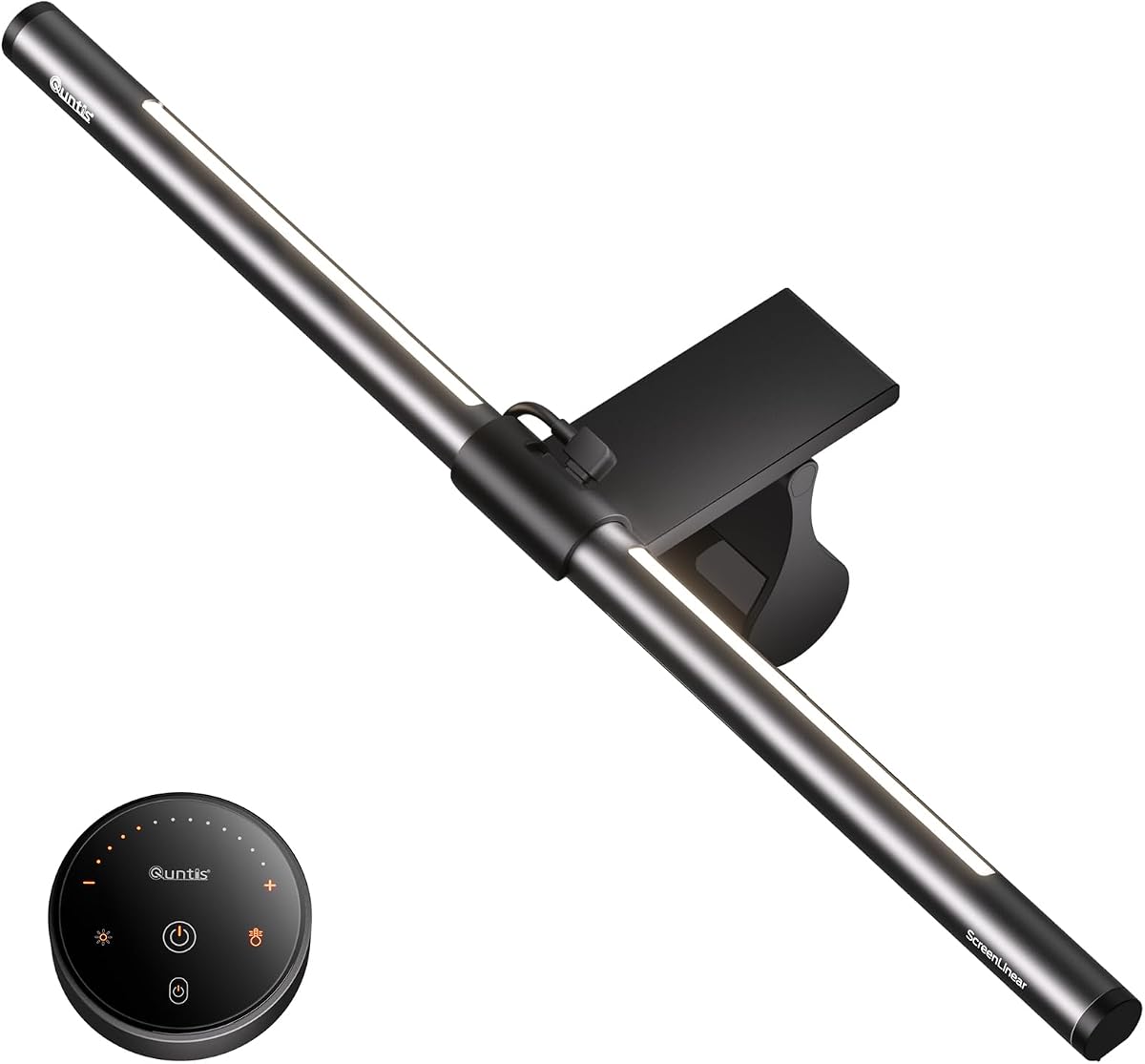
The Quntis Computer Monitor Lamp earns high marks for its auto-dimming capability and high color rendering index. It is designed to adapt to ambient light conditions for optimal eye comfort automatically.
We may earn a commission when you buy through this link, at no additional cost to you.
Its certified blue light reduction and flicker-free technology make it suitable for long work sessions. The asymmetrical design directs light away from the screen to prevent glare.
While it does not include a wireless remote the touch controls are responsive and intuitive. The auto-dimming feature adds convenience by adjusting brightness based on room conditions.
This lamp is ideal for professionals who value color accuracy and adaptive lighting. It balances premium features with a reasonable price point for quality eye care.
The built-in sensor monitors room brightness and adjusts output to prevent eye strain caused by sudden light changes.
With a high CRI this lamp ensures colors appear true to life which benefits designers and color critical tasks.
We may earn a commission when you buy through this link, at no additional cost to you.
This RGB Monitor Light Bar combines task lighting with ambient mood lighting for a versatile setup. It offers independent controls for front and backlight making it great for gaming or relaxation.
We may earn a commission when you buy through this link, at no additional cost to you.
The front light eliminates glare while the backlight adds depth to your screen experience. Both lights offer multiple modes and can be remembered for quick access.
While it may lack advanced sensor features the dual mode functionality provides a unique benefit for users who want atmosphere alongside task lighting.
Consider this model if you enjoy customizable lighting effects and need both work and entertainment options. It delivers solid eye care at a friendly price.
The 9 mode RGB backlight creates an immersive environment that enhances gaming visuals and reduces screen contrast.
Separate buttons for front and back lights allow independent operation to tailor your lighting for any situation.
We may earn a commission when you buy through this link, at no additional cost to you.
YEELIGHT Monitor Light Bar offers a premium metal build and high safety standards for eye care. Its RG0 rating ensures no hazardous blue light is emitted making it safe for prolonged use.
We may earn a commission when you buy through this link, at no additional cost to you.
The design is sleek and low profile which avoids obstructing webcams during calls. Stepless dimming and color adjustment provide precise control over your lighting environment.
While it uses touch controls the build quality and optical performance are robust. It is suitable for modern desks where aesthetics and durability matter.
Choose this model if you want a durable and safe lighting solution with accurate colors. It fits well in professional and home office settings.
Meeting the highest blue light safety standard this lamp minimizes potential eye damage during extended screen use.
The metal body helps dissipate heat efficiently keeping the unit cool and extending its lifespan over time.
We may earn a commission when you buy through this link, at no additional cost to you.
The LYMAX Monitor Light Bar includes a wireless remote for convenient adjustments from your seat. It features gravity damper clip for stability and fits a wide range of monitor thicknesses.
We may earn a commission when you buy through this link, at no additional cost to you.
With touch and remote control options users can easily switch between lighting modes without reaching for the unit. The flicker-free output supports comfortable viewing.
While the remote runs on a battery it is small and easily stored. The metal enclosure adds to the durability and sleek look of the lamp.
This model is great for users who value remote access to lighting controls. It offers a good balance of features and ease of use.
The included remote allows you to control light settings from anywhere at your desk without moving your hands.
The weighted clip ensures a secure fit without needing screws which protects your monitor surface from damage.
We may earn a commission when you buy through this link, at no additional cost to you.
This 16.14 inch light bar provides broad coverage for large desks with a compact and portable design. It offers three color temperature settings and memory function for consistent lighting.
We may earn a commission when you buy through this link, at no additional cost to you.
The counterweight clip allows quick installation without tools making it easy to move between setups. The glare free design protects your eyes during long use.
While it lacks smart features it delivers reliable basic lighting at a reasonable price. It is a good option for users who value simplicity.
Choose this model if you need a straightforward lighting solution for gaming or study. It is effective at reducing eye strain with minimal setup.
The extended width ensures light reaches across wide desks eliminating shadows and providing even illumination.
You can attach the light bar quickly with the counterweight clip without needing any additional tools or hardware.
We may earn a commission when you buy through this link, at no additional cost to you.
The Pzloz LED Desk Lamp offers a flexible arm design for adjustable lighting angles. It features multiple color temperatures and brightness levels for versatile use.
We may earn a commission when you buy through this link, at no additional cost to you.
The remote control allows easy mode switching and the clamp base saves desk space. It is suitable for drafting and detailed work requiring directional light.
Although it differs from traditional monitor bars the adjustability provides unique benefits for specific tasks. It is a good alternative for users who need directed light.
Select this lamp if you want flexible positioning rather than a fixed bar. It works well for creative tasks needing variable illumination.
The 360 degree rotation and swing arms let you direct light exactly where you need it on your desk.
This lamp provides directional light similar to architect lamps which is ideal for focused tasks like reading or drafting.
We may earn a commission when you buy through this link, at no additional cost to you.
This Quntis Monitor Light Bar features 24 RGB modes for a customizable ambient experience. The dual light system covers both task and environment needs effectively.
We may earn a commission when you buy through this link, at no additional cost to you.
It delivers high color accuracy and ensures webcam visibility during calls. The memory function saves your favorite settings for convenience.
While the RGB options are extensive the core task lighting remains strong. It is a fun and functional choice for gamers and streamers.
Pick this model if you want vibrant lighting options alongside solid eye care. It combines style with practicality for modern desks.
With 24 RGB settings you can create an immersive environment that matches your mood or game content.
The low profile design ensures your webcam remains unobstructed during video calls making it practical for remote work.
We may earn a commission when you buy through this link, at no additional cost to you.
The Quntis Monitor Light Bar Glow offers a dual light system with a protective light cover for comfort. It ensures eye shielding from direct glare and offers adjustable brightness.
We may earn a commission when you buy through this link, at no additional cost to you.
The sliding clip design fits a range of monitors securely without damage. Stepless dimming allows precise control over light intensity and color temperature.
While it lacks RGB features the focus on eye comfort and glare reduction is strong. It is a reliable choice for work focused environments.
Consider this model if you want a practical solution for reducing eye strain. It delivers consistent performance with user friendly controls.
The included light cover protects your eyes from direct glare while still providing sufficient illumination for tasks.
The sliding clip adjusts to fit monitors of various thicknesses ensuring a stable mount without damaging the screen.
We may earn a commission when you buy through this link, at no additional cost to you.
Selecting the right light behind monitor for eye care involves evaluating several key factors to ensure it meets your specific needs.
The optical design determines how light is directed to your workspace. Asymmetrical designs are preferred because they illuminate your desk without reflecting on your screen causing glare.
Look for products that specify no glare or asymmetric optical design to ensure your screen remains clear during use.
Blue light can contribute to eye strain and disrupted sleep cycles. Many modern lamps include filters or certified safe blue light levels.
Choose models with RG0 certification or blue light hazard free labeling for better eye protection.
Adjustable brightness and color temperature allow you to adapt lighting to your environment and task needs. Stepless dimming provides more precise control than preset levels.
Ensure the lamp has touch or remote controls that make adjustments easy without interrupting your workflow.
The mounting system should fit your monitor securely without causing damage. Clips with soft pads or counterweights are ideal for stability.
Check the thickness range compatibility to ensure the light bar fits your specific monitor model.
Color Rendering Index (CRI) measures how accurately a light source displays colors. Higher CRI values are essential for designers and color sensitive work.
Look for a CRI of 90 or above to ensure true to life color representation on your desk.
Most monitor lights are USB powered for convenience. USB-C is preferred for modern compatibility but standard USB works as well.
Verify the cable length is sufficient to reach your power source without cluttering your desk setup.
Wireless controllers or remotes add convenience to adjusting lighting settings. They allow you to make changes without reaching for the monitor.
Consider if you need these features or if touch controls on the bar are sufficient for your usage.
Some lights offer additional modes like RGB backlight for ambiance or multiple color temperatures for different tasks.
Select a model that matches your preferences for functionality beyond basic task lighting.
Install the light bar on the top center of your monitor ensuring it clips securely. Align it so light shines downward on your workspace and not into your eyes.
Adjust brightness and color temperature to match your room conditions. Lower temperatures and brightness levels work best for evening use to reduce strain.
Keep the light surface clean by wiping it gently with a soft dry cloth. Avoid moisture to protect the electronic components and maintain performance.
Yes these lights reduce the contrast between your bright screen and dark surroundings which is a major cause of eye fatigue. They also provide task lighting that minimizes squinting and focusing issues.
Most modern monitors offer clips adjustable to fit curved screens. Check the product specifications for curved monitor compatibility before purchasing to ensure a secure fit.
Since it mounts directly on the monitor it frees up valuable desk space that would otherwise be used by a traditional lamp. This helps maintain a clean and organized workspace.
Absolutely many models include ambient backlight modes to enhance gaming atmosphere while keeping your eyes comfortable. They help reduce the contrast strain common during gaming sessions.
Quality models are designed with blue light filters or safe emission standards. Look for certifications like RG0 or flicker-free to ensure the light is safe for long term use.
Most LED lights in this category last for over 30,000 hours or more. This equates to many years of daily use without significant degradation in light output.
The BenQ ScreenBar Halo 2 offers the best overall features for professionals while the Monitor Light Bar Eye-Care provides excellent value for budget shoppers. Your choice depends on the advanced features you prioritize.
Prioritize optical design and blue light protection to ensure the light actually helps your eyes rather than adding to strain. Consider additional features like wireless controls if convenience is important.
Prices and availability are subject to change so verify current offers before buying. A light behind monitor for eye care is a worthwhile investment for long term visual health.