
Universal Audio Apollo Twin X DUO Gen 2
4.5Editor score
Unison preamps
200+ UAD plug-ins
Auto-Gain feature
This guide compares the top ten audio interfaces with built in Dsp to help you find the best model for recording, streaming, or live performance needs.
Audio interfaces with built in Dsp allow musicians and creators to process sound directly on the hardware. This reduces latency and saves computer power during critical recording sessions.
We analyzed ten top models based on conversion quality, DSP capabilities, connectivity options, and included software. Each option offers unique features for different workflows and budgets.
Every pick highlights key strengths and trade-offs to guide your decision. Prices and availability change frequently, so verify current details before making a final purchase.
4.5Editor score
4.7Editor score

4.0Editor score
Here is a side-by-side comparison of all ten models to highlight their core specifications and unique selling points for your specific studio setup.




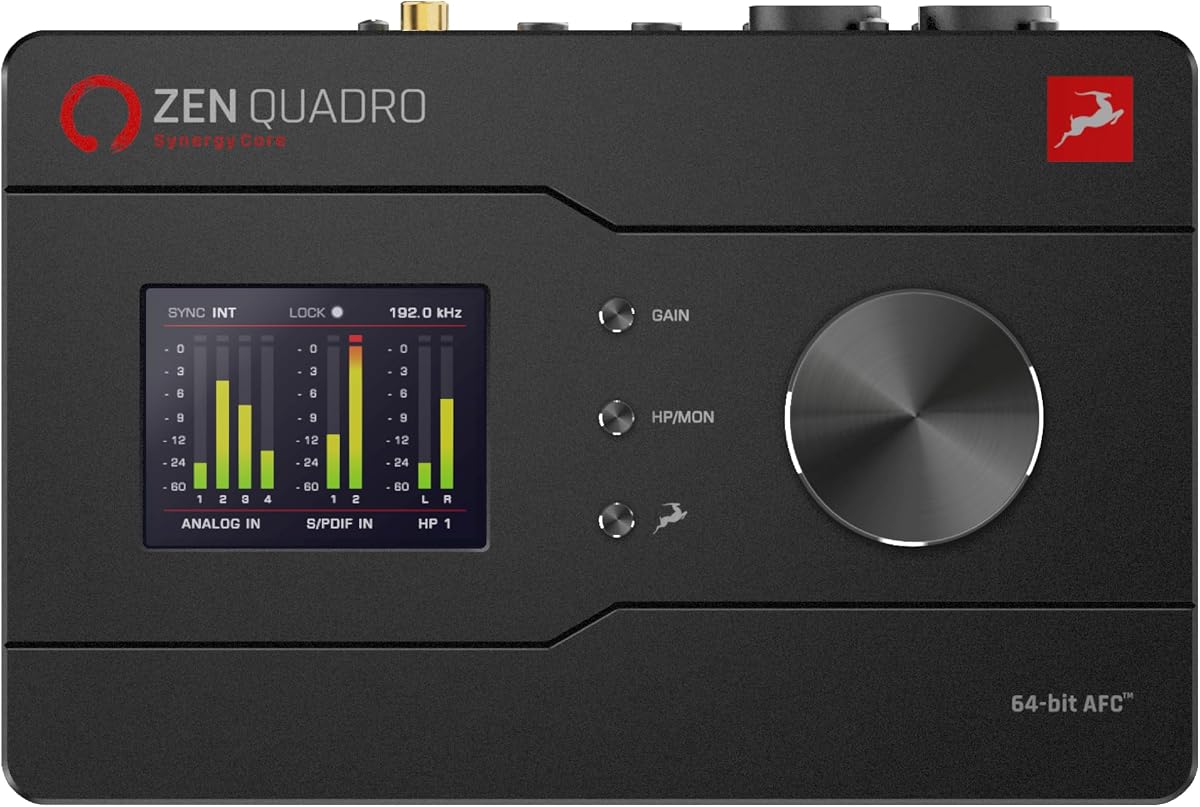
The Antelope Audio Zen Quadro stands out as a top choice for creators seeking professional DSP capabilities. It offers a 130 dB dynamic range and near-zero latency recording thanks to its dedicated FPGA hardware.
We may earn a commission when you buy through this link, at no additional cost to you.
You can track through over thirty-seven included effects with access to ninety more. The interface supports modern workflows with dual USB-C ports for connecting a computer and a mobile device simultaneously.
While the interface is compact and bus-powered, some advanced routing might require additional power. However, this trade-off ensures portability without sacrificing high-end sound quality.
Buyers looking for a versatile hub for studio, stage, and mobile setups will find this interface ideal. It balances performance and convenience better than most competitors in its price class.
The Synergy Core system runs analog-modeled compressors and EQs on dedicated hardware for real-time processing without CPU load.
Dual USB-C and ADAT inputs allow for flexible routing and expansion, making it suitable for complex multi-source recording needs.
We may earn a commission when you buy through this link, at no additional cost to you.
The Apollo Twin X QUAD Gen 2 delivers next-generation audio conversion with the widest dynamic range in its class. It lets you record in real time through authentic emulations of classic gear.
We may earn a commission when you buy through this link, at no additional cost to you.
You gain access to over two hundred UAD DSP and Native plug-ins. The Unison preamps provide unmatched flexibility by letting you change hardware models while recording.
Though expensive, the unit justifies its cost with professional-grade tools like Apollo Monitor Correction. This ensures accurate mixes regardless of your room or headphones.
Professionals seeking top-tier analog tones and real-time mixing will benefit most. It remains a benchmark for high-fidelity USB recording in a desktop form.
Unison preamps allow you to load plug-in emulations that alter the physical impedance of the preamp for realistic tone shaping.
Apollo Monitor Correction powered by Sonarworks helps flatten frequency response issues in your listening environment for accurate mixing.
We may earn a commission when you buy through this link, at no additional cost to you.
The DUO Gen 2 offers similar analog tone capabilities as the QUAD but with slightly fewer DSP cores. It is perfect for those who want high-end processing without the top-tier price tag.
We may earn a commission when you buy through this link, at no additional cost to you.
Bass management allows adding a subwoofer to your monitoring setup. This feature helps in crafting accurate low-end response for mixes on any system.
You get the same library of two hundred plus plug-ins and the Auto-Gain feature. These tools streamline your workflow so you focus on creativity.
This interface is ideal for producers needing reliable DSP power at a moderate cost. It bridges the gap between consumer gear and professional studio standards.
Bass management helps you optimize low-end clarity by integrating a subwoofer seamlessly into your main monitor mix.
Auto-Gain quickly sets optimal levels across inputs, reducing setup time and preventing clipping during initial recording phases.
We may earn a commission when you buy through this link, at no additional cost to you.
The Zenith 2 is a portable powerhouse designed specifically for streamers and podcasters. It includes a complete virtual guitar audio interface and a Smart Vocal Chain for instant professional results.
We may earn a commission when you buy through this link, at no additional cost to you.
Its onboard DSP allows you to record with zero lag and monitor through effects in real time. This eliminates the need for heavy host CPU load during live sessions.
While it may lack multi-track depth for full album production, it excels in live scenarios. Independent headphone mixes support collaboration without extra hardware.
Creators who want a standalone solution with rich tone shaping will love this unit. It delivers studio quality in a compact device suitable for any environment.
Direct Hi-Z inputs with built-in amp simulations turn the interface into a complete virtual pedalboard for guitarists.
The device works driver-free on most systems, ensuring easy setup for those without deep technical expertise or system control.
We may earn a commission when you buy through this link, at no additional cost to you.
The Yamaha URX22 B brings a 4.3 touchscreen to the interface world. It supports 32-bit audio and offers dual USB ports for versatile connectivity options for creators.
We may earn a commission when you buy through this link, at no additional cost to you.
Built-in DSP ensures latency-free monitoring with included FX suites. The high gain range supports various microphones without external preamps.
As a newer product, real-world reviews are scarce. However, its feature set suggests strong potential for those who prefer touch control over physical knobs.
Buyers seeking a modern touch interface with basic DSP needs will find it compelling. It offers convenience and flexibility in equal measure for daily use.
The touchscreen lets you adjust levels and effects intuitively, speeding up setup and operation for fast-paced sessions.
Dual USB ports allow you to stream from multiple devices or back up audio seamlessly without extra hardware.
We may earn a commission when you buy through this link, at no additional cost to you.
The SSL 2 MKII Plus carries on the legacy of 4K analog enhancement. It provides a clean signal path with high-resolution conversion for detailed recordings.
We may earn a commission when you buy through this link, at no additional cost to you.
Its zero-latency monitoring ensures you hear yourself instantly while recording. The unit is bus-powered and includes MIDI I/O for integrated control setups.
While it lacks complex DSP mixing, its simplicity is a strength. You get pure audio conversion and classic analog tone shaping without software dependency.
This interface suits those who want classic SSL sound in a simple package. It remains a top pick for podcasters and musicians valuing analog warmth.
The 4K mode adds harmonic richness inspired by classic consoles, giving tracks immediate presence and character.
Its simple layout ensures you focus on music rather than navigating complex menus or software drivers during recording.
We may earn a commission when you buy through this link, at no additional cost to you.
The MOTU UltraLite-mk5 offers an 18×22 channel count ideal for large sessions. It supports four simultaneous audio channels over USB and includes DSP for robust monitoring.
We may earn a commission when you buy through this link, at no additional cost to you.
Its CueMix 5 app allows complex routing without CPU load. You can create unique headphone mixes for every musician in the room easily.
While it uses USB 2.0, it still delivers rock-solid performance. The OLED display provides clear metering that is vital for live sound management.
Ensembles and bands needing extensive input options will appreciate this unit. It provides a balanced mix of expandability and sound quality for serious work.
CueMix 5 lets you control mix settings from any connected device, offering flexibility for remote or on-site engineers.
DSP-driven monitor mixing ensures that your mixes are unaffected by computer performance or software latency issues.
We may earn a commission when you buy through this link, at no additional cost to you.
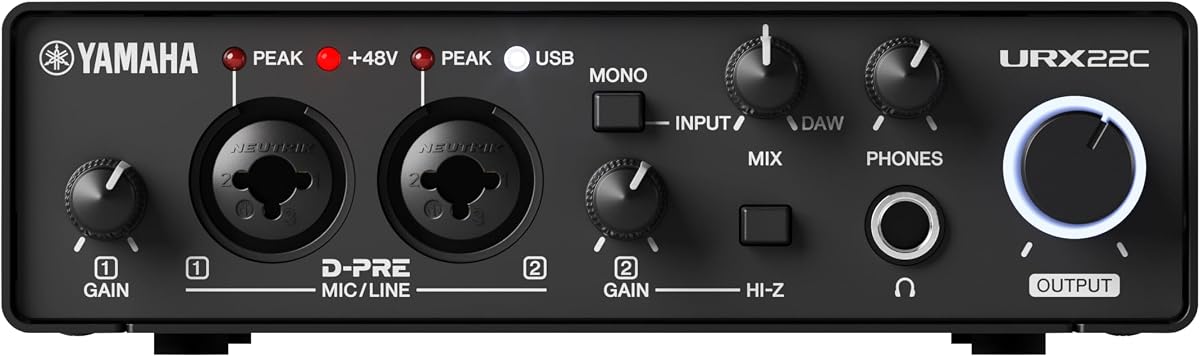
The URX22C features Class-A D-PRE preamps known for their clean and detailed sound. Its metal housing ensures durability for those who transport gear often.
We may earn a commission when you buy through this link, at no additional cost to you.
DSP-powered monitoring includes REV-X reverb and amp classics. This allows you to record with effects applied directly through the hardware.
Although it only has two inputs, the quality is high. It pairs well with software like Cubase AI for a complete recording solution.
This interface is perfect for beginners and intermediate users needing reliability. It delivers professional tone and tools at a fair price point.
The D-PRE preamps provide a wide dynamic range and low distortion for accurate capture of any instrument.
DSP effects like REV-X enhance your sound before it hits your DAW, allowing for more creative decisions during recording.
We may earn a commission when you buy through this link, at no additional cost to you.
The Wave XLR MK.2 is built for voice clarity and streamer workflow. It delivers massive gain for any XLR mic and uses Wave FX to unify DSP effects.
We may earn a commission when you buy through this link, at no additional cost to you.
Wave Link software allows precise routing and effects. You get ultra-low-latency monitoring so you hear exactly what your audience hears.
Touch controls with LED feedback give you instant visual cues. This is vital during live streams when you need quick adjustments.
Streamers and podcasters will find this unit tailored to their needs. It bridges the gap between simple mics and complex studio setups effectively.
Wave Link allows you to route system audio and microphone signals through DSP effects seamlessly on your computer.
The touch dial with LED feedback provides immediate visual status of your levels without needing to check your monitor.
We may earn a commission when you buy through this link, at no additional cost to you.
The Scarlett Solo 4th Gen brings big studio sound to solo creators. It features the same converters as flagship interfaces and a huge dynamic range for clear audio.
We may earn a commission when you buy through this link, at no additional cost to you.
Air mode lifts vocals and guitars to the front of the mix. This adds presence and rich harmonic drive that simplifies production.
The included Hitmaker Expansion provides essential effects and mastering tools. This makes it a complete package for starting your first production.
Solo songwriters and beginners will find this unit unmatched in value. It offers professional tools without overwhelming complexity or cost.
Air mode enhances harmonics and adds clarity to recordings, giving your voice a polished and modern sound instantly.
This suite includes essential effects and instruments that help you finish tracks without needing expensive third-party plugins.
We may earn a commission when you buy through this link, at no additional cost to you.
Selecting the right interface requires understanding how DSP impacts your workflow and budget. This guide outlines key factors to help you make an informed decision.
DSP processing power determines how many effects you can run simultaneously without latency. More cores allow complex chains like EQ, compression, and reverb during tracking.
Look for interfaces that advertise FPGA or dedicated DSP chips for real-time performance.
Connectivity determines how many devices you can connect at once. USB-C, Thunderbolt, and ADAT provide different levels of speed and channel capacity.
Ensure the interface matches your computer's ports and your future expansion needs.
Preamp quality defines how clean and noise-free your recordings start. High-quality preamps with low noise floors capture detail accurately.
Check specifications for dynamic range and gain to find the best match for your microphones.
Software ecosystems like UAD or Synergy Core affect what plugins you can use. A robust library saves money and unlocks professional sounds.
Choose a system with tools that fit your genre and workflow preferences.
Portability matters if you travel often. Some units are bus-powered and compact, while others are larger desktop models.
Balance the need for mobile convenience with the features you need at home.
Zero-latency monitoring is critical for live performance. It lets you hear your signal and effects instantly without delay.
Prioritize interfaces that offer dedicated DSP monitoring solutions.
Budget impacts features but not always quality. Some mid-range units offer premium features that rival expensive models.
Determine what you truly need versus what is marketing fluff.
Future expandability ensures the interface grows with your studio. ADAT or S/PDIF inputs allow adding more channels later.
Invest in a unit that supports additional inputs and outputs for longevity.
Connect your interface via the recommended cable such as USB-C or Thunderbolt. Install the latest drivers from the manufacturer to ensure optimal DSP performance.
Adjust your monitoring mix using the control panel. Use the built-in DSP features to apply EQ and reverb before recording.
Keep the unit clean by dusting with a soft cloth. Avoid moisture and excessive heat to protect internal components and maintain longevity.
Built-in DSP allows you to process audio directly on the hardware. This reduces latency during recording and saves computer resources for other tasks.
Not necessarily. Since DSP handles the effects load, you can use lighter CPUs. However, a decent system is still required for playback and file storage.
Many modern units support USB-C connections for iPad or Android. Check specific compatibility before purchasing for mobile streaming needs.
Unison preamps combine analog hardware with digital plugins. They change the preamp's impedance to emulate classic gear in real time during recording.
Some standalone models allow recording without a computer. Others require a DAW to route audio even if DSP handles the effects.
Use the manufacturer's control center app to check for updates. Regular updates often improve stability and unlock new features or effects.
Yes, Air mode uses DSP to enhance harmonics. It adds clarity and presence to vocals and guitars during recording or playback.
Most interfaces have fixed hardware cores. However, software subscriptions may expand the plugin library you can use without hardware changes.
The ten models reviewed here offer diverse options for every level. From budget to premium, DSP adds value by delivering professional sound and low latency.
Prioritize features like connectivity and plugin libraries to match your goals. A unit that fits your workflow will be easier to use daily.
Remember that prices change frequently. Check current deals before purchasing to get the best value for your studio.