
HDMI Audio Extractor Splitter
4.2Editor score
Compact lightweight design
Affordable price point
4K 30Hz support
Compare the top 10 HDMI Audio Extractor models for 2026 to find the best device for splitting audio from your 4K or 8K HDMI video sources.
Modern home theater setups often struggle with audio routing when devices lack dedicated outputs. An HDMI Audio Extractor solves this by pulling sound from video signals to your speakers. This guide helps you choose the right splitter for your specific needs.
We evaluated ten top-rated extractors based on resolution support, audio formats, and ease of use. Each product was compared against strict criteria including bandwidth, HDMI version compatibility, and build quality. Our goal is to find reliable tools for seamless audio integration.
Every pick in this list highlights key strengths and potential trade-offs to help you decide. Remember that product availability and pricing can shift frequently online. Always verify the current offer before making your final purchase for your setup.
4.2Editor score

4.2Editor score

4.4Editor score
This table compares the top ten models across key specifications to help you find the right fit.






The OREI 8K@60Hz Extractor stands out as the top choice for high fidelity audio extraction. With a 4.2 star rating it balances advanced features with practical utility. It is designed for users who need future proof performance for their media setups.
We may earn a commission when you buy through this link, at no additional cost to you.
Its 48Gbps bandwidth supports HDMI 2.1 protocols including QFT and ALLM. This ensures smooth video pass through without degradation. The ARC support allows it to work with TVs that send audio back to external speakers.
The device does not support eARC which may limit lossless audio from specific modern TVs. This trade off is acceptable for most users needing standard Dolby or DTS surround sound. It handles 1080P@120Hz well for gaming.
This model is ideal for enthusiasts wanting 8K compatibility. If you need the highest resolution support with ARC the OREI 8K is the best investment. It delivers reliable performance for demanding AV configurations.
The 48Gbps FRL bandwidth ensures that high resolution video passes through without dropping frames or losing color depth.
ARC support allows you to extract audio from TVs that lack optical outputs making setup easier for soundbars.
We may earn a commission when you buy through this link, at no additional cost to you.
This HDMI Audio Extractor Splitter offers the most affordable entry into audio extraction. It is rated 4.2 stars for its simplicity and value. It works well for basic setups where high refresh rates are not required.
We may earn a commission when you buy through this link, at no additional cost to you.
It supports 4K@30Hz and 3D which covers many standard devices. The lightweight design allows it to hide easily behind a TV. Power is provided via a USB cable included in the package.
The main limitation is the lack of ARC which means it cannot extract audio from TV inputs. It works best with external sources like consoles or media players. This is a minor issue for users who own external boxes.
If you need a cheap solution for a game console this is the pick. It is not for high end TVs but it does the job for standard content. The included accessories make it ready to use immediately.
Its small size and USB power mean it adds no bulk to your entertainment center setup.
It maintains 3D signal integrity so old 3D Blu-ray setups still work with external audio.
We may earn a commission when you buy through this link, at no additional cost to you.
The OREI HDMI Audio Extractor ARC holds a high 4.4 star rating. It balances premium features with stable performance. This unit is excellent for users needing ARC to pull audio from modern TVs.
We may earn a commission when you buy through this link, at no additional cost to you.
It supports 4K@60Hz and HDR10 which keeps video quality intact. The downmix feature ensures stereo output from multi-channel sources. CEC pass through helps maintain remote control functionality for some devices.
The price is higher than basic models and TV volume control via remote is limited. This is standard for optical extractors. The benefits of high resolution ARC audio outweigh these small issues.
Choose this if you need 4K 60Hz and ARC together. It is a solid premium choice for home theaters. It delivers high performance without the complexity of more expensive gear.
ARC support allows audio extraction from TV apps without needing extra cables to the console.
It converts 5.1 channels to 2.0 stereo on analog outputs so any speaker works.
We may earn a commission when you buy through this link, at no additional cost to you.
The VPFET Extractor is a reliable tool for standard 1080P and 4K sources. It has a 4.1 rating for its stability in various setups. It is great for older devices that do not need ARC.
We may earn a commission when you buy through this link, at no additional cost to you.
It offers three modes including 2.0CH and 5.1CH. This lets you choose the right audio format. The Pass mode helps when signals drop. It supports DTS 5.1 on optical output.
It lacks ARC and newer HDCP versions which restricts modern TV use. This is a fair trade off for the lower cost. It works well with game consoles and set top boxes.
Pick this if you need a basic optical extractor. It is robust and simple to use. It fits budget setups without sacrificing core audio quality.
The 3 modes let you optimize audio based on your receiver capabilities.
It uses minimal power and only needs a USB port for operation.
We may earn a commission when you buy through this link, at no additional cost to you.
The OREI 4K@60Hz Converter is designed for modern 4K sources. It has a 4.2 rating for its consistent video performance. It supports Atmos pass through which is rare for extractors in this range.
We may earn a commission when you buy through this link, at no additional cost to you.
It maintains full 4K resolution without video degradation. The metal housing helps with heat dissipation. This is a durable option for long term use. It comes with a dual voltage adapter.
The lack of ARC limits it to HDMI source inputs only. This is acceptable if you use external players. It does not support 1440p120Hz so check your device first.
Get this for high quality 4K audio extraction. It is a solid middle tier pick. It balances performance and durability well.
The metal casing helps dissipate heat during long streaming sessions.
It allows Dolby Atmos signals to pass through to compatible systems.
We may earn a commission when you buy through this link, at no additional cost to you.
The eSynic Professional Extractor has a top 4.5 star rating. It focuses on high fidelity ARC audio for TVs. It supports eARC for higher bandwidth than standard ARC. This makes it great for soundbars.
We may earn a commission when you buy through this link, at no additional cost to you.
It offers 192kHz sampling which captures fine audio details. The signal indicators help you verify the status easily. It works only with ARC/eARC ports so it is specific.
It does not support optical output or Dolby bitstreams. It requires PCM which some users may find limiting. But for stereo analog sound it is excellent.
This pick is best for stereo audiophiles with ARC TVs. It delivers clean sound without noise. Check your TV support before buying.
eARC mode provides better bandwidth for lossless audio from streaming apps.
Advanced processing reduces interference for a smooth listening experience.
We may earn a commission when you buy through this link, at no additional cost to you.
This J-Tech Extractor is designed for gamers needing high refresh rates. It holds a 4.1 rating for stable performance. It supports 1080P@144Hz which is great for monitors.
We may earn a commission when you buy through this link, at no additional cost to you.
It passes HDR10 signals which enhances video quality. The unit handles Dolby Digital pass through well. CEC function ensures controls stay active for some remotes.
It does not support 4K 120Hz so PS5 4K gamers might need higher bandwidth. It is still solid for most PC and console setups. PCM settings are required for analog output.
Select this for high refresh 1080P or 4K 60Hz setups. It is affordable and reliable. It works well with older gaming PCs.
Support for 144Hz ensures smooth gameplay visuals with audio extraction.
CEC pass through helps control devices without extra remotes.
We may earn a commission when you buy through this link, at no additional cost to you.
The VPFET eARC Extractor handles modern TV audio well. It has a 4.1 rating. It supports both Optical and Coaxial outputs which is rare. This helps with older receivers.
We may earn a commission when you buy through this link, at no additional cost to you.
The 192kHz rate ensures high fidelity audio. An independent status indicator lights up to show operation. It uses a compact design for easy placement.
It does not have CEC so volume control may be manual. It is designed strictly for TV ARC ports. Ensure your TV supports eARC before using.
This is best for those needing Coaxial digital output. It offers versatility for audio systems. It delivers solid performance for the price.
Simultaneous Optical and Coax outputs let you connect multiple devices.
The LED shows when the device is active and ready.
We may earn a commission when you buy through this link, at no additional cost to you.
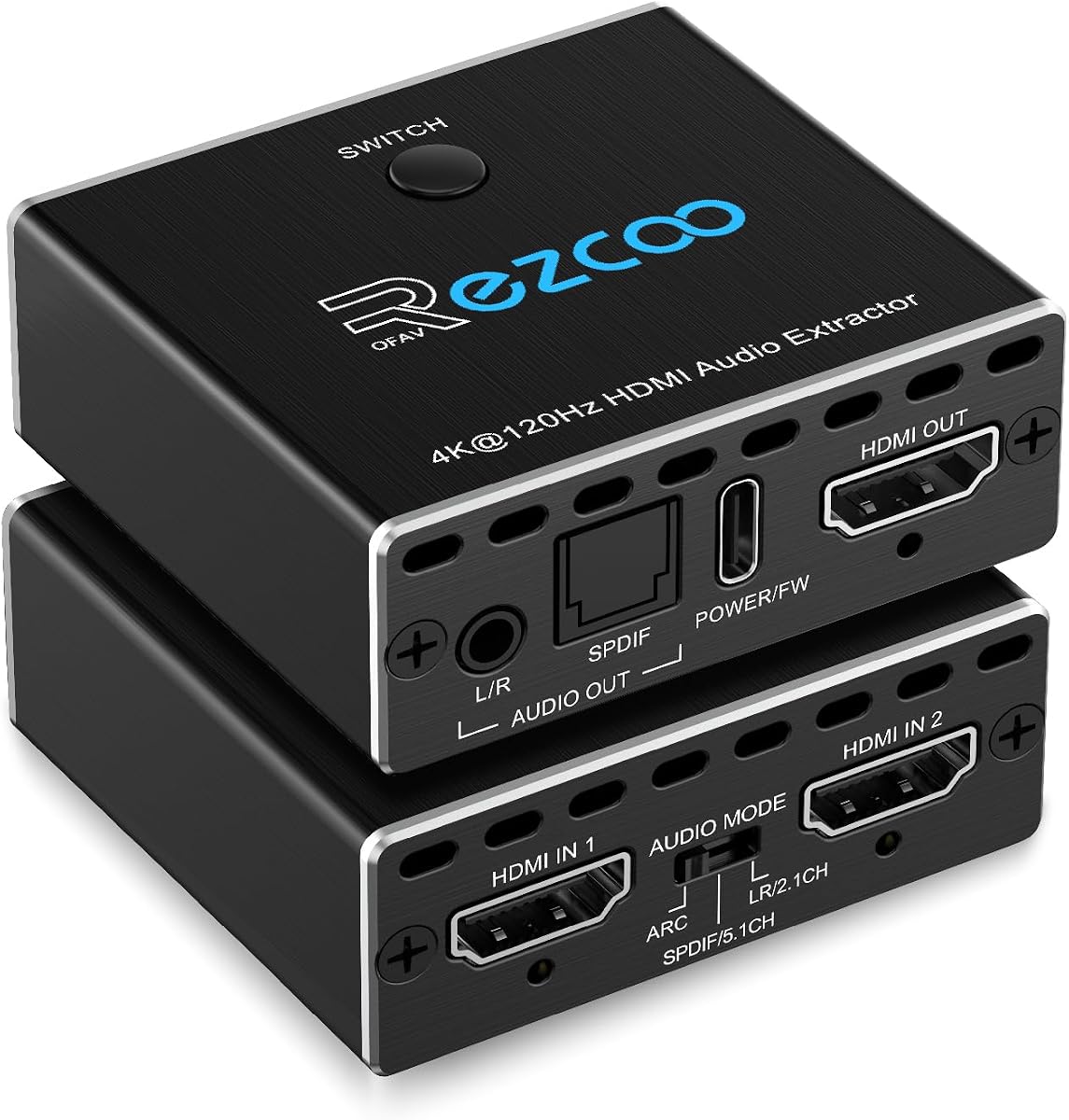
This 2-in-1 Switch has a perfect 5.0 rating. It combines extraction and switching in one box. This is ideal for consoles needing both audio and video output.
We may earn a commission when you buy through this link, at no additional cost to you.
It supports 4K@120Hz which is vital for modern gaming. HDMI 7.1 output is available for surround sound. The auto switch feature adds convenience.
You need a specific HDMI 2.1 cable for best results. It is pricier than single input extractors. This trade off is worth it for multi console setups.
Choose this if you have multiple consoles. It simplifies connections. It is a top rated choice for gamers.
Two inputs let you switch sources without unboxing cables.
Supports full 7.1 audio for surround systems.
We may earn a commission when you buy through this link, at no additional cost to you.
This Extractor handles 8K 60Hz and 4K@120Hz. It has a 4.2 rating. It supports eARC for high fidelity TV audio. It is the ultimate choice for future setups.
We may earn a commission when you buy through this link, at no additional cost to you.
Triple operating modes offer flexibility for different audio types. It supports Dolby Vision and HDR10. It is built for high end systems.
Direct TV input as source is not supported. You must use HDMI sources. This adds complexity for TV users. But for performance it is best.
Get this for 8K readiness. It handles high resolution audio well. It is a powerful tool for enthusiasts.
Three modes ensure you get the right audio for any device.
Full 8K pass through ensures no video loss.
We may earn a commission when you buy through this link, at no additional cost to you.
Choosing the right extractor depends on your TV model and desired audio outputs.
Check if your device supports 4K 60Hz or 8K. Newer models are better for future proofing.
Ensure bandwidth matches your source to avoid signal drop.
ARC allows audio extraction from TVs with HDMI output. eARC offers higher bandwidth for lossless audio.
If you have an optical out TV, ARC is essential.
Look for support of Dolby Digital and DTS 5.1. Some models only output PCM stereo.
Verify if your receiver needs specific bitstreams.
Decide if you need Optical, Coaxial, or 3.5mm. Some models offer dual outputs.
Ensure your speakers match the output type.
HDCP 2.2 is needed for 4K sources. HDCP 1.4 is for older devices.
Mismatched versions will cause signal failure.
Most use USB or DC adapters. Ensure you have a power source nearby.
USB powered units are more portable.
Metal enclosures dissipate heat better. Plastic units may overheat.
Check for durability and warranty.
CEC lets you control devices with one remote. Not all extractors support this.
If you hate remotes, check CEC pass through.
Connect the HDMI input from your source device to the extractor's IN port.
Connect the HDMI output from the extractor to your TV or display.
Plug the optical or analog cables into the extractor's audio output ports.
If your TV lacks optical audio output and you use HDMI for video, you need one. It separates sound for better speakers.
Many support 4K@30Hz or 60Hz. Check specs to ensure your resolution is supported.
ARC extractors work with ARC enabled TVs. Verify your TV has HDMI ARC ports.
Most require USB or DC power. Some use USB from the source device.
High quality extractors prevent latency. Check reviews for sync performance.
Yes it works with soundbars via optical or analog inputs.
Pass through depends on the model. Look for Atmos support in specs.
Optical outputs do not allow TV volume control. Use external volume.
The OREI 8K and eSynic models lead in performance. Pick based on your resolution needs.
Prioritize ARC support and output type. These are the most critical factors.
Always check current prices and availability. Deals change often on major retailers.